Thinking Latency
Three short tests that time how long a small decision takes
Try Thinking Latency
Three short tests, about two minutes in all. Use a keyboard if you have one; touch works too. Your times stay in this browser tab and are not saved or sent anywhere.
- 1Reaction
- 2Colour words
- 3Switching rules
- ✓Results
Before you start
Find somewhere you can focus for a couple of minutes. Each test explains itself first, and you can skip any of them. Use a keyboard if you have one: it’s more precise than a touchscreen.
Nothing is sent anywhere. Your times stay in this browser tab and are gone when you close it.
How Long Does a Small Decision Take?
Deciding whether a number is odd feels instant. It still takes time, and that time changes with the circumstances. A decision slows down when the information disagrees with itself, and again when the rules have just changed, even when the person knows exactly what to do.
Thinking Latency makes that delay visible. Visitors complete three short tests, then see their own response times laid out answer by answer. The point is not to produce a score. It is to show, in a few hundred milliseconds, that being fast and being ready to decide are different things.
Three Tests, Three Kinds of Delay
The first test is a plain reaction. A panel turns bright after a random pause, and the visitor responds as soon as they see it. Pressing too early is caught and the attempt is repeated, so guessing the rhythm does not help.
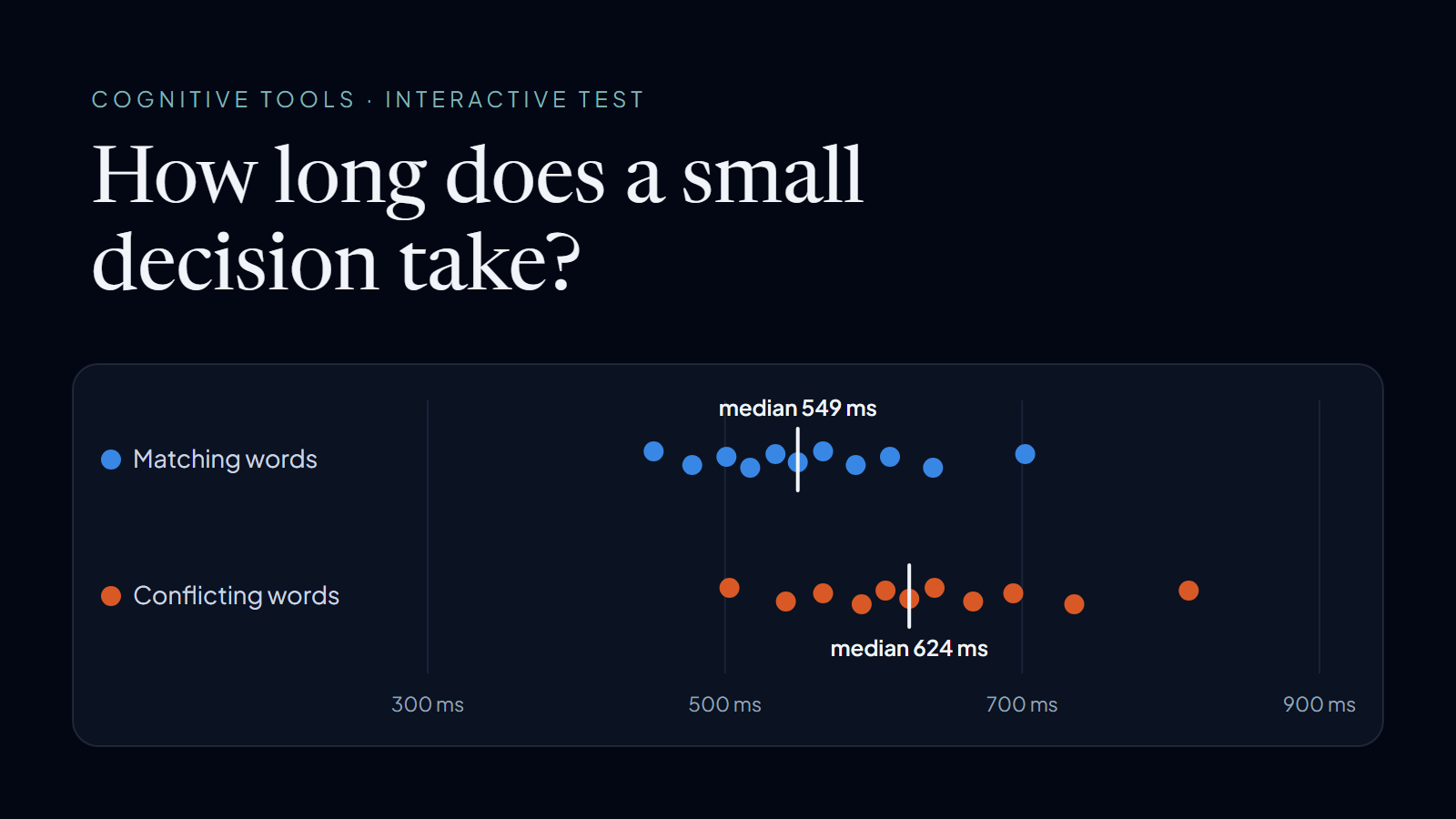
The second is a colour-word test, based on the effect John Ridley Stroop described in 1935. A colour name appears in coloured ink, and the visitor answers with the ink, not the word. Half the words match their ink and half conflict. Reading happens automatically, so a conflicting word competes with the answer, and the page reports the difference between the two medians.
The third uses the alternating-runs design from Rogers and Monsell's 1995 task-switching study. A number appears in the top or bottom half of a box. The top asks whether it is odd or even; the bottom asks whether it is lower or higher than five. The number changes halves every two turns, so half the answers follow a rule change and half repeat the previous rule. The difference between those two medians is the cost of switching.
Measuring a Few Hundred Milliseconds
Each stimulus is timestamped on the animation frame after it renders, using the browser's high-resolution performance clock. This brings the measurement closer to the moment something actually appears on screen. Responses are read on pointer down rather than click, so the time a finger or mouse button takes to release is not counted.
Results use medians rather than averages, so one distracted answer does not dominate. Wrong answers are drawn as hollow dots and left out of the timing, and the first trial of the switching test is not scored because it has no previous rule to compare with. The four ink colours were chosen to stay distinguishable for common types of colour blindness, and the test screens stay dark in both site themes so every ink reads clearly.
Reading the Results
Each test reports one headline figure, a chart of every answer with the median marked, accuracy, and a rough range for comparison. The ranges are context rather than norms. Screens, keyboards, touch hardware, and browsers all add their own delay, and two dozen trials on an ordinary device give a picture that will vary between attempts.
This is a demonstration, not a psychological assessment. Nothing is stored or sent: the results exist only in the open tab and disappear when it closes.
Why It Sits Beside the Writing
The same gap appears at a larger scale in software. An AI system can produce an answer far faster than a person can check it, and a fast result is useful only once someone is ready to act on it. The Latency of Human Thought looks at that gap in AI tools. Thinking Latency offers a small, personal version of it that can be measured in a couple of minutes.
Project Highlights
- Reaction, colour-word, and rule-switching tests in about two minutes
- Timing starts when the stimulus is drawn on screen, and false starts are caught
- Every answer charted with medians, accuracy, and approximate reference ranges
- Keyboard and touch input, with results kept only in the open tab